I am currently working on a scenario where I am building an NFT gallery with a dedicated details page for each asset. To achieve this, I have set up a Data Group to list the NFTs from the details of the data group coming from an external api response as this : All Nfts of a collection | DrapCode | Build Awesome Web Applications
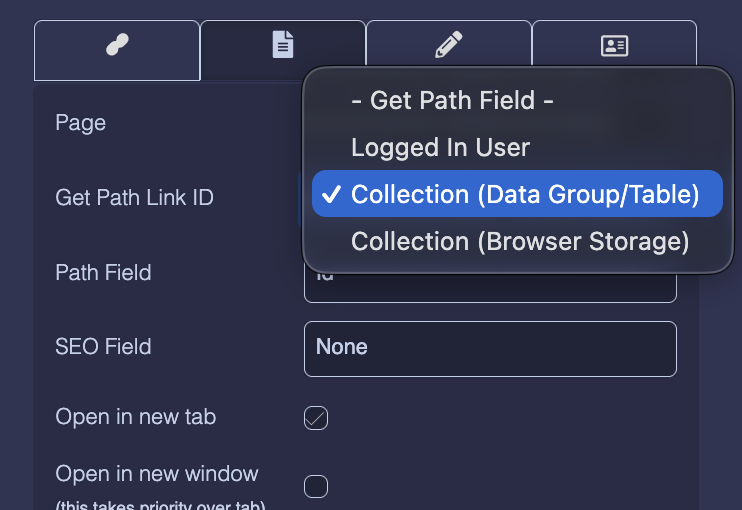
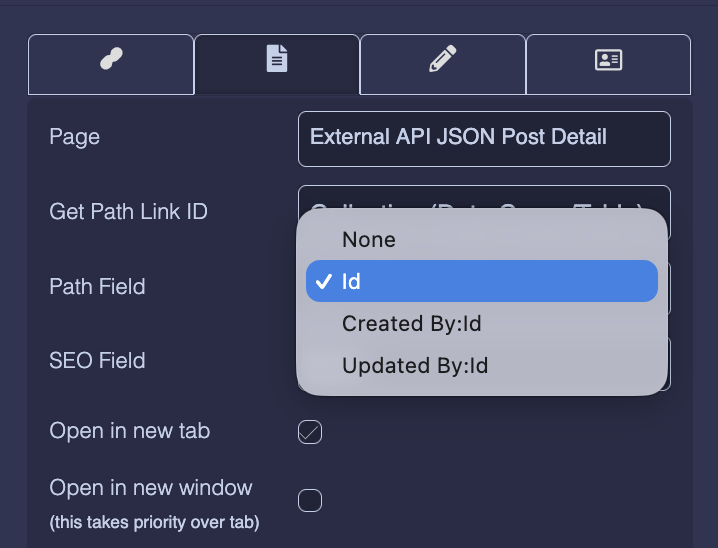
My current challenge is with the Link component settings. I need to pass the NFT ID as a dynamic Path Field to ensure the link opens the specific details for the selected NFT. However, when I select the Collection (Data Group/Table) option under “Get Path Link ID,” the fields from my specific Data Group are not appearing in the dropdown.
Could you please help me resolve this so I can correctly map the dynamic ID and proceed with the build?
This is the same situation i was facing with parent child relationship on some of my collection where am after binding everything ,there path id is not also bringing " get path id from parent collection " which keeps brining linking problems … please help me overcome this
Hi @Nigel - We have a office holiday today so, we’ll look into it as soon as we are back in office. Meanwhile, if you can send us a screen recording of your External API setup on DrapCode and the URL address link which gets generated on the redirected page. Also the API response data using the Postman app. So that we can understand what needs to be configured correctly.
Thank @alitanwir literally to say am not facing problems with external apis for now but i would like to just get clarification just to clear my confusion with regards to what am seeing on demo versus my use case with regards to details page . Am getting this confusion on both building details page through child parent relationship and when using api response - Get path field and path id . all demo videos by Vishal shows that it brings the parent collection field but in all my cases its not so am gettig confused whether am missing something or something changed since the videos . I attached this video to explain exactly where my issue is so that you wont waste much time dealing with things am not facing problems with : DrapCode | Build Awesome Web Applications
Hi @Nigel
We have these options in Get Path Link ID :
Logged In User - It takes the User collection and its ID field value for redirection. (Basically used when redirected to another page with the current logged-in User ID.)
Collection (DataGroup/Table) - It takes the associated collection with the DataGroup/DataTable component and its ID field value for redirection.
Collection (Browser Storage) - It takes the Collection and its ID field value from the browser’s session storage for redirection.
Page Collection - It takes the Collection associated with the page and its ID field value for redirection.
So, in your use case, please select the Collection (DataGroup/Table) option.