High @vishsahu I am trying to design my collection forms so that they are not monotonously long and look unwelcoming. On many occasions I have not been able to adjust the columns. I have only been able to do so once and unfortunately cannot locate the form at the moment. Below is a screenshot of a column whose values are at 50% yet it visually remains at 100%. What could be the problem…
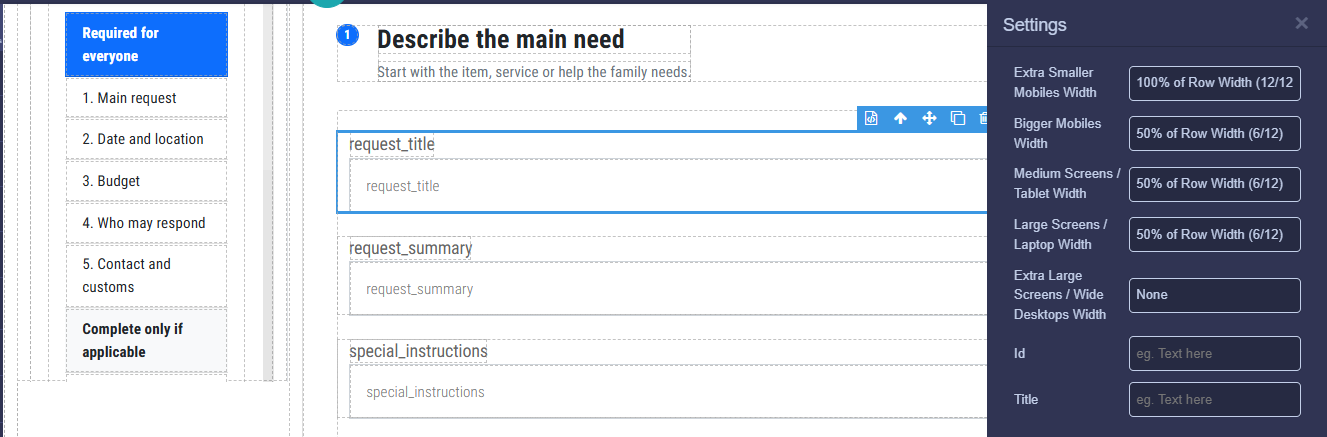
@WillieMak Could be because of the CSS. Can you try removing the CSS classes which are getting added by default?
Thanks @vishsahu Let me try that. Was now copying custom HTML with the look I want. Then insert collection fields in the dummy fields…
When you test that, inspect the field wrapper in browser dev tools and check its computed width, flex-basis and min-width. A default class setting width:100% or min-width will override the 50% collection setting. Also confirm the column setting is applied to the wrapper, not just the inner input, especially in your custom HTML—if the wrapper uses CSS grid, set grid-template-columns rather than relying only on the field width option.
1 Like
Thank you @sophiabrown Thats anothe option/tool into my bag, thank you very much.
I actually ended up removing all css classes from the classes panel and then inserting my own. It was quite a revelation for me. kkkkk
Good day