Greetings @vishsahu
I am trying to set up a way of allowing a user to select multiple options applicable to their account type, in the form of cards, then such selection be prefilled in a registration form in the next step. I am looking for a way on how I can set an event that would achieve this. See image below. each card represents a potential selection.
so once selections have been made, then a single button will save the selection in the relevant collection. More like a multi-select dropdown.
Hoping I have stated my question clearly
Thanks
@WillieMak,
You can create a static or dynamic option for each of these types and allow users to multi-select them when they are onboarding.
Here, on this page, you can show/hide these cards on the basis of whether that option was selected by them or not during onboarding.
This way, they will only see the cards which should be enabled for them.
Hie @vishsahu
Quite honestly, I am kind of lost here. i have not grasped what you are saying. Do you have a video or a section explaining this or part of this process in Drapcode?
Thanks
You need to show/hide cards using visibility conditions, like below:
Thanks.
1 Like
Thanks @vishsahu
Will watch these and workout my way forward…
Good day
Greetings @vishsahu
My apologies if i seem to be going in circles. What I need is to be able to set up a way a user can select a card and that selection is equivalent to selecting an item on a dropdown menu in a collection form. Look at the UI below and what I want is to enable a user to select a card of their choice and then proceed to the next step in the registration process, which may have more such cards. Is what I am asking possible? I have four steps and each of the first three steps narrow down options by each step (more like cascading dropdown effect)
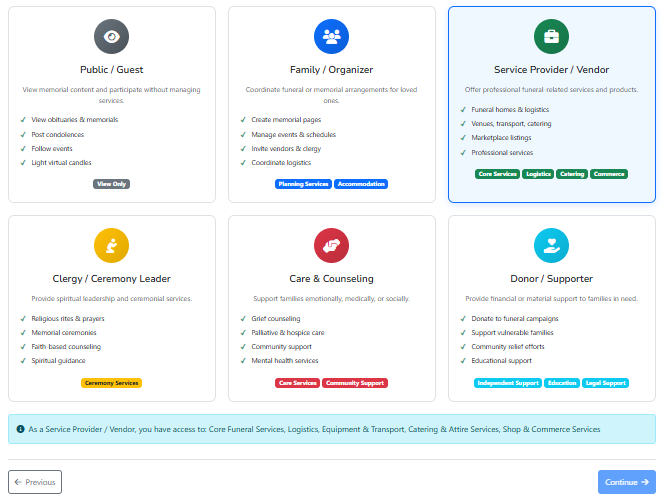
Thanks
Hi @WillieMak,
We do support checkboxes or multi-select dropdown for selecting multiple items.
The cards UI which you have build, will probably need to be done with some javascript code as i don’t see any ready-made way to handle this.
Thanks.
1 Like
Thanks @vishsahu
Javascript is still a challenge for me but checkboxes in place of dropdown I now understand. So i will stick to collection forms combined with hardcoded cards for information and guidance. However i have been wondering how i can set up the checkboxes for agreeing to terms when completing registration as condition for proceeding for example. Do you have instruction or a video I can watch for this
Thanks.